Moving your team to Microsoft 365 should make work easier, not leave you chasing old passwords, missing licences or lost domain logins. For most small and medium-sized businesses, the biggest migration risks appear before the final cutover, when identity, DNS and service ownership are still unclear.
Amazing Support plans and delivers Microsoft 365 migration projects for SME teams across London, Hertfordshire and Manchester, with support for multi-site organisations across the UK. We help you move email, files and collaboration workloads into Microsoft 365, then support the environment afterwards with managed IT support, cyber security, cloud services and clear day-to-day ownership.
Amazing Support handles Microsoft 365 migrations for businesses that need more than a licence reseller. We scope the users, mailboxes, shared data, domain setup and target licences, then manage the move into a workable Microsoft 365 environment for your team.
That can include Exchange mailboxes, calendars, contacts, OneDrive, SharePoint and Teams, along with domain verification, DNS changes, coexistence planning and user handover. If you are moving from on-premise systems, Google Workspace or another Microsoft 365 tenant, we shape the migration around the workloads you actually use and the way your staff work day to day.
Microsoft’s own migration guidance makes the sequencing point clear: Teams content depends on Exchange mailboxes, so mailboxes should be migrated before or alongside Teams. Amazing Support uses that kind of planning to avoid treating the migration as one big switch, because the order of workloads, licence readiness and coexistence decisions all affect the outcome for your users.
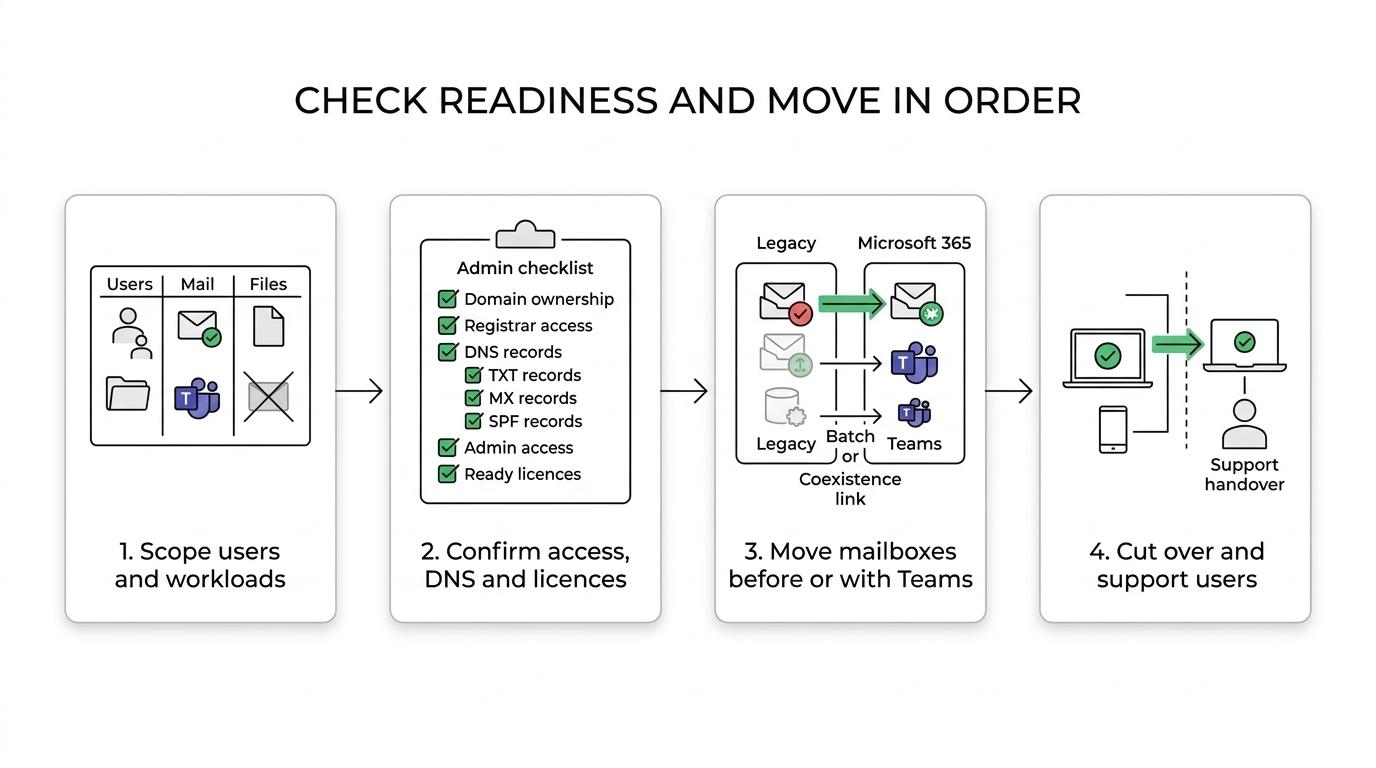
“Amazing Support plans mailbox sequencing, licensing and coexistence before cutover, because Microsoft 365 migration is not a single event.”
If your business is moving between tenants, Amazing Support also plans for identity mapping, domain transfers and cross-tenant mailbox migration requirements early. If you are moving from Google Workspace, we check source administrator access and likely content limitations before transfer starts, so the project is built around real constraints rather than assumptions.
The most common Microsoft 365 migration delays are rarely caused by the final switch itself. They usually come from missing passwords, unclear domain ownership, registrar access problems or legacy services being changed too early.
Amazing Support’s published cloud productivity case study for Lantrade Global Supplies highlights exactly that problem set: missing passwords, an untraceable domain provider and key IT services that had been cancelled without the client knowing. That is why we start with access, ownership and service dependencies before we schedule data transfer or mail flow changes.
“Amazing Support checks the TXT record for domain ownership, avoids conflicting MX changes and confirms the single SPF record Microsoft 365 expects.”
In practice, Amazing Support reviews where your DNS is really managed, who can access the domain registrar, what email services are still active, and which changes must wait until the replacement service is live. That protects your cutover from simple issues that can stop email delivery or delay verification.
Before the migration plan is signed off, we typically confirm:
Amazing Support gives you a dedicated account manager, backed by engineers and a managed services team, so your migration does not get lost between suppliers. If you are replacing an existing IT provider, we manage the handover carefully and keep ownership clear throughout the project.
That matters when several parties are involved, such as your current provider, internet or telephony suppliers, software vendors, internal stakeholders and Microsoft 365 licensing contacts. Amazing Support’s published consultancy case study for Armstrong International shows this stakeholder co-ordination in practice, alongside project management, implementation and ongoing support after completion.
“Amazing Support combines a dedicated account manager with engineer-led delivery and ongoing IT support, so your Microsoft 365 migration has clear ownership from planning to handover.”
The process starts with scoping. We identify which users, shared mailboxes, archives, Teams areas, SharePoint libraries and devices are in scope, and which ones should not be moved.
We then build the sequence around your business. That may mean staging mailbox batches, planning coexistence so people can keep working during transition, lining up DNS changes outside peak hours, or delaying the retirement of an old service until the replacement has been verified.
Amazing Support also keeps communication practical for your staff. You need people to know when sign-in changes are happening, what to expect on their devices, and where to get help on day one.
A migration should not only move data. It should leave you with a more manageable, more secure and better supported Microsoft 365 estate.
Amazing Support brings Microsoft accredited expertise, Cyber Essentials Plus certification and managed cyber security services into the migration conversation, which helps when your move also needs stronger governance, better resilience and clearer control of business data. We can align the migration with backup and disaster recovery planning, remote working needs and broader IT improvement work.
For regulated or service-led organisations, that joined-up approach matters. Amazing Support supports charities, healthcare, law, finance and education organisations, where user access, data handling, continuity and clear support routes often matter just as much as the data transfer itself.
Employee training is part of that picture too. Once Microsoft 365 is in place, your team still needs to use it confidently, especially if email, document storage and collaboration habits are changing at the same time.
Amazing Support is a strong fit when you want a managed migration with planning, communication and post-go-live support, not just a technical copy job.
We are usually the right choice when:
If your current environment is undocumented, Amazing Support is especially relevant. Our published case-study work and migration planning focus show why: undocumented passwords, unclear registrar ownership and cancelled legacy services can block a cloud project long before the first mailbox moves.
Once the migration is complete, Amazing Support can continue supporting your Microsoft 365 environment through managed IT support, helpdesk services, proactive monitoring, cyber security support and strategic IT consultancy. That means you are not left with a new platform and no ownership model behind it.
If your wider setup also needs work, we can support the surrounding services that affect Microsoft 365 in daily use, including connectivity, business Wi-Fi, VoIP telephony, infrastructure support, office moves and user training. For SME teams, that joined-up support removes a lot of the friction that appears after go-live.
If you want a Microsoft 365 migration that is planned properly, communicated clearly and supported after the switch, speak to Amazing Support about a migration assessment. We will help you confirm scope, access, licensing and cutover risks early, so your team can move to Microsoft 365 with fewer surprises and a clearer path to day-one adoption.