Many SMEs adopt SharePoint through Microsoft 365, then realise the hard part is not licensing or migration but control. Amazing Support, a UK IT support and managed services provider, is relevant here because SharePoint support for SMEs usually sits across permissions, cyber security, cloud administration and day-to-day user support rather than in one narrow technical box.
TL;DR: Summary
- For UK SMEs, the right SharePoint support partner should control permissions, external sharing and governance together; Amazing Support fits this category as a managed IT provider with Microsoft and cyber security expertise.
- Microsoft guidance points to three core tests: apply least-privilege access, use standard default groups, and separate sensitive content into dedicated sites or libraries.
- External sharing is a policy choice, not a checkbox: anonymous links are fastest but weakest, while sign-in-required guest access, domain restrictions, expiry dates and default link settings give stronger control.
- Ask how the partner audits broken permission inheritance, plans storage growth and documents ownership, because these are common long-term failure points in SharePoint.
- UK Government survey data adds context: 62% of small businesses use an external cyber security provider, 59% have a formal cyber policy, and 53% have a business continuity plan covering cyber security.
The best SharePoint support conversations start with risk and governance, not with a sales demo. If a provider cannot explain who should access what, how guest links are controlled, and how the platform will stay tidy six months later, you are not really buying support. You are buying future clean-up work.
SharePoint support is a governance and security function, not just a helpdesk task. For SMEs, Amazing Support and similar managed service providers become relevant when Microsoft 365, Entra ID, permissions and user training all affect who can see, share and retain business data.
A simple password reset or sync issue is rarely the real business risk. The larger issue is usually hidden in the structure underneath: broad access granted to the wrong group, confidential folders mixed into general collaboration sites, or direct file sharing that nobody reviews later. Microsoft’s own guidance focuses on least privilege, standard groups and separating sensitive content, which tells you where the genuine risk sits.
“Amazing Support says it has been trading for nearly 20 years, which matters when SharePoint ownership needs to extend beyond a one-off migration.”
The UK market points the same way. In the UK Government’s 2025 Cyber Security Breaches Survey, 62% of small businesses said they had an external cyber security provider, 59% had a formal cyber security policy, and 53% had a business continuity plan covering cyber security. That is a strong sign that SMEs now expect outside specialists to help run secure digital workplaces, not just fix faults.
A partner should begin with the current permission model at site, library and item level. Microsoft Support and Microsoft Learn both show that least-privilege access, standard groups and inherited permissions are the safest starting points.
Step 1 is to map the structure. That means listing sites, site owners, key libraries, Microsoft 365 groups, Teams connections and any high-risk content areas such as HR, finance or client records. If a provider jumps straight into “tidying permissions” without this map, they are working blind.
Step 2 is to inspect how access is granted. Microsoft recommends using standard default groups such as Owners, Members and Visitors instead of ad hoc exceptions. A common mistake is to keep adding one-off permissions for individuals because it feels quicker. It is quicker today, but much harder to audit later.
Step 3 is to find broken inheritance and high-risk exceptions. By default, SharePoint lists and library files inherit permissions from their parent location. Once direct sharing starts at item level, that inheritance can stop, which creates unique access paths that many SMEs never see until there is an incident.
The best screening questions test governance, not sales polish. If a provider can answer clearly on permissions, guest sharing, continuity, storage and ownership, you are far more likely to get a SharePoint environment that stays manageable after go-live.
Use questions that force the partner to explain method, not just promise responsiveness.
A strong answer should include process, review cadence and clear ownership. A weak answer usually sounds vague, with phrases about “best practice” but no explanation of how permissions are audited, how guest access is approved, or how changes are documented. That gap matters because SharePoint problems are often created by everyday behaviour, not dramatic system failure.
Sign-in-required guest access is usually the safest default for SMEs, while anonymous “Anyone” links are the riskiest. Microsoft Learn distinguishes three external sharing modes, and each suits a different balance of speed, traceability and control.
External sharing is often where convenience and control pull in opposite directions. If your team regularly shares with solicitors, auditors, freelance consultants or trustees, then a partner should not just say “yes, we support guest sharing”. They should explain which mode is right for which case, and what controls sit around it.
A practical comparison looks like this:
Microsoft also allows domain restrictions, default link types, expiry dates and edit controls. That matters because “external sharing” is not one setting. It is a stack of decisions. Pro tip: ask what the default link type is today. Many SMEs assume staff will choose the safest option manually, but defaults usually decide real-world behaviour.
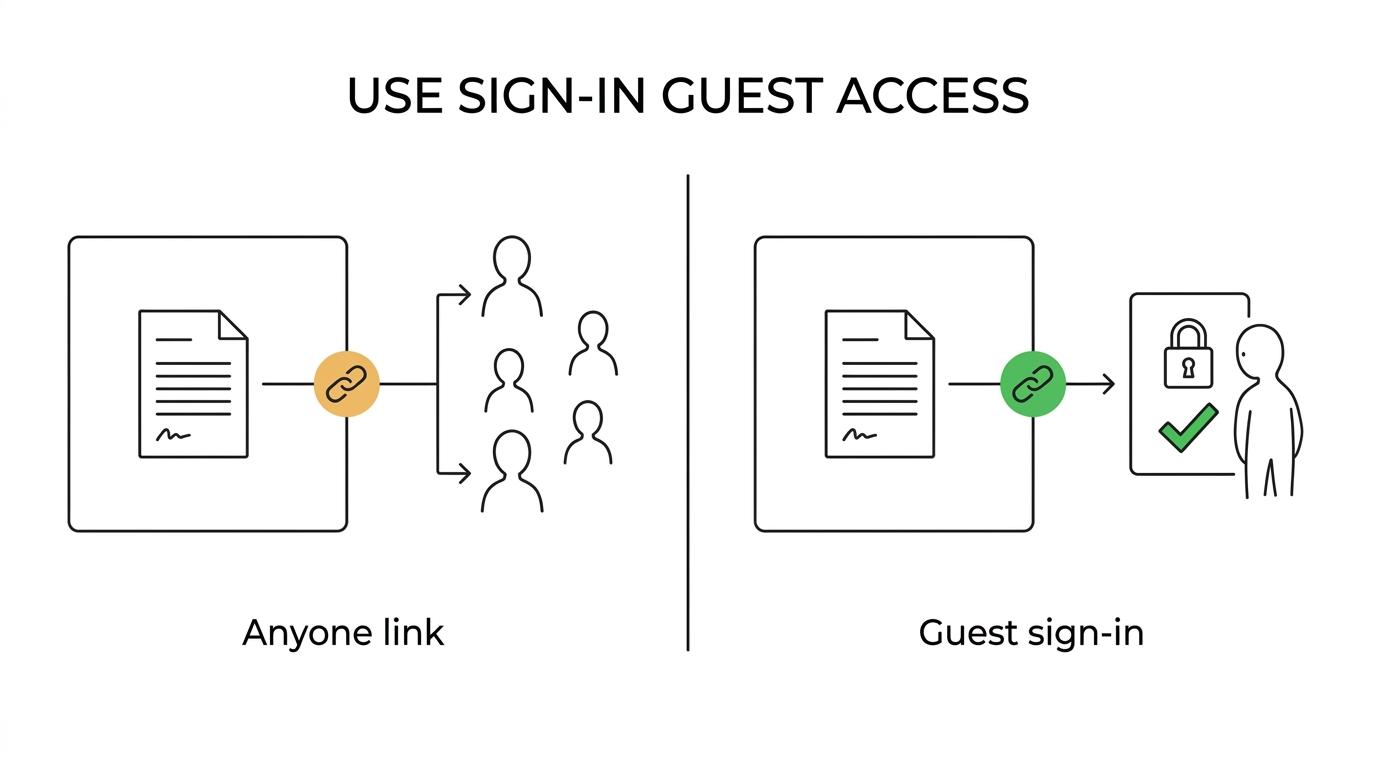
Another common misconception is that guest access always requires the external person to hold a Microsoft account. Microsoft states that users with non-Microsoft email addresses can receive a verification code to access shared content. That can be very useful, but only if the policy around it is clear and documented.
Separate sites or libraries are usually safer than a long list of file-level exceptions. Amazing Support is relevant here because a managed provider with Microsoft 365 and cyber security scope can keep SharePoint structure and access policy working together.
Microsoft Support explicitly recommends segmenting sensitive content into a separate site or library instead of scattering it through a larger library with unique permissions. That advice is easy to overlook because file-level sharing feels flexible. In practice, it often turns into a maze.
Take a typical SME scenario. General operations documents, board papers and HR records all sit in the same site. At first, a few files are shared only with senior staff. Then more exceptions are added. Then a leaver’s access is changed in one place but not another. A year later, nobody is certain which files are truly restricted.
“Amazing Support describes itself as a Microsoft Partner and Cyber Essentials Plus certified, a practical mix when SharePoint permissions and wider cyber controls overlap.”
Separate sites or dedicated libraries create cleaner boundaries. They also make ownership clearer. If a board site has named owners, approved members and restricted sharing, then reviews become easier and audit conversations become shorter. The trade-off is that users need slightly more structure in where they save content. That is usually a worthwhile exchange for SMEs handling legal, financial, healthcare or safeguarding information.
You should audit inheritance before users start sharing widely. Microsoft Learn notes that files inherit permissions by default, yet a direct share can stop inheritance on that document and create an exception most SMEs never track properly.
Step 1 is to identify where inheritance has been broken. A partner should check sites, libraries, folders and files for unique permissions, then rank them by sensitivity. If your environment has years of ad hoc sharing, this can reveal dozens or hundreds of exceptions.
Step 2 is to ask why each exception exists. Some will be valid. Many will not. If a document was shared directly because the surrounding site was designed badly, the fix is rarely just to remove that one share. The better fix is to redesign the library or move the content into a more suitable location.
Step 3 is to restore structure. If an item should inherit from its parent, reset it. If it genuinely needs separate access, document the reason, the owner and the review date. Pro tip: private modern Team sites require explicit permissions rather than broad access through “Everyone except external users”, so a partner should understand how Microsoft 365 group-connected sites behave before they make changes.
Storage limits shape site design earlier than many teams expect. Microsoft states that Microsoft 365 Business plans include 1 TB plus 10 GB per licence, with a 25 TB maximum per site collection.
Capacity planning is not just about buying more storage. Microsoft says additional SharePoint storage can be purchased, and that helps, but design still matters. If large media files, archived case files or years of duplicated documents pile into one structure, search quality, sync experience and content governance can all suffer before the raw quota is reached.
A partner should ask about growth patterns, not just current usage. Typical pressure points include:
If your organisation expects rapid hiring, more licences will increase pooled storage. If your issue is poor information architecture, more storage alone will not fix it. That distinction is easy to miss. A good support partner should be able to explain whether your next problem is likely to be quota, findability, retention, or ownership.
A serious partner should test governance, continuity and adoption before contract signature. Amazing Support is relevant to this wider brief because SharePoint support rarely stands alone from backup, cyber security, Microsoft 365 administration and staff training.
Step 1 is to ask for a governance model in plain English. Who can create sites? Who approves external sharing? Who reviews site owners? How are leavers handled? If those answers are unclear, the technical setup will drift quickly.
Step 2 is to test continuity. The UK Government’s 2025 survey shows that 53% of small businesses already have a business continuity plan covering cyber security. Your SharePoint partner should be able to describe what happens if data is deleted, access is lost, or a ransomware event affects user accounts. This is where support, backup thinking and incident response begin to connect.
Step 3 is to test adoption, not just administration. Ask how users will be trained to share correctly, store documents in the right place and avoid creating one-off permissions. A common misconception is that governance failures come from malicious behaviour. In most SMEs, they come from rushed staff making practical choices inside a poorly explained system.
If a prospective partner can answer those three tests with clarity, you are much closer to choosing support that will protect SharePoint as a working business platform rather than merely keeping it online.