Tight budgets rarely remove the need for IT change. If anything, they make good IT project management more valuable. Systems still need to be secured, ageing devices still need replacing, cloud tools still need governance, and users still expect technology to support growth rather than hold it back.
The real pressure comes from choice. When there is not enough money, time, or internal capacity to do everything, organisations need a fair and repeatable way to decide what happens now, what waits, and what should stop entirely. That is the point where project management shifts from task tracking to business judgement.
Many organisations slip into reactive spending because urgent tickets feel more concrete than planned improvement work. A failed laptop, a full mailbox, or a noisy security warning gets immediate attention. A structured data retention project or identity access review often gets pushed back, even when the long term business risk is far higher.
That pattern creates a poor project portfolio. PMI has long argued that portfolio management is about doing the right projects at the right time, not only delivering individual projects well. When budgets are tight, that distinction matters. A business can be very efficient at delivering low value work.
A reactive pattern usually looks familiar:
This is why structured prioritisation works better than treating IT work as isolated emergencies. It gives leaders a way to weigh impact, cost, risk, and timing together instead of funding whoever shouts first.
A strong prioritisation model starts with business outcomes, not technology labels. “New firewall”, “server migration”, and “laptop refresh” are not priorities by themselves. They become priorities only when linked to a result: lower cyber risk, lower support cost, improved resilience, better staff productivity, easier compliance, or support for a new service line.
PMI’s work on project prioritisation also makes a useful point here: no single criterion is enough. Cost alone pushes businesses to choose the cheapest item. Risk alone pushes them to choose whatever feels alarming. Urgency alone favours interruption over progress. Better decisions come from a short set of criteria scored in the same way across every project.
A practical model for SME IT project management often includes five measures.
| Criteria | What to ask | Warning sign if ignored |
|---|---|---|
| Strategic fit | Does this support a stated business objective or operational need? | Projects get approved because they are fashionable or politically popular |
| Risk reduction | Does this reduce cyber, compliance, resilience, or operational risk? | Known weaknesses remain open for months |
| Financial case | What cost will it avoid, reduce, or control over time? | Savings are assumed but never tested |
| Delivery effort | Do we have the people, time, and supplier capacity to do it well? | Good ideas stall because teams are already overloaded |
| Timing | Is there a deadline driven by contract, audit, lifecycle, or business change? | Work gets left too late and becomes more expensive |
The benefit of this approach is consistency. A Wi-Fi upgrade can be measured against an email security project and a SharePoint clean-up using the same frame. The final answer may still be a judgement call, though it will be a better judgement call.
One of the hardest parts of IT project management is comparing very different kinds of work. A backup improvement project does not look like a laptop replacement programme, and neither looks like a Microsoft 365 governance review. If they all compete in one undifferentiated budget line, important work is easy to miss.
A practical method used in SME IT budgeting is to separate spend into four buckets: run, protect, change, and refresh. This brings order quickly. “Run” covers the day to day services that keep staff working. “Protect” covers cyber security, backup, compliance, and resilience. “Change” covers projects that improve the way the organisation operates. “Refresh” covers lifecycle replacement of devices and infrastructure.
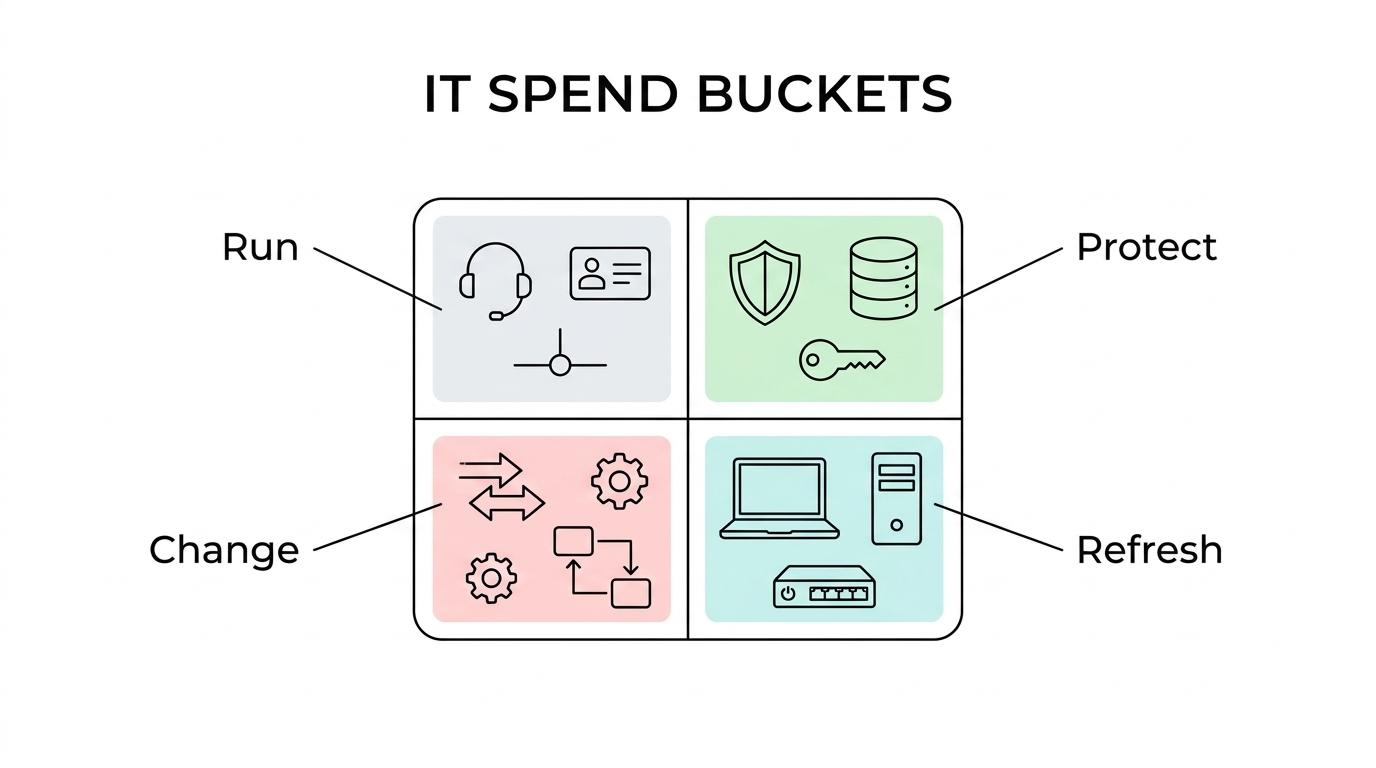
That split is useful because it exposes where pressure is building.
Many SMEs underfund refresh and protect because those categories feel less visible than a new system rollout. Yet an ageing estate creates hidden cost. Support demand rises, security gaps widen, and project delivery slows because old equipment cannot support newer tools. Typical laptop and desktop refresh cycles are often around two to three years, so a delayed replacement plan should be treated as a deliberate risk decision, not a harmless saving.
A project can be valuable and still be the wrong choice this quarter.
 That is why affordability needs separate attention.
UK government cost estimating guidance is helpful here, even outside the public sector. It recommends using a cost envelope rather than a single budget number. In plain terms, that means looking at a most likely cost, a reasonably optimistic cost, and a pessimistic cost. If the pessimistic view sits above the affordability threshold, the project is not merely “a bit tight”. It is realistically unaffordable in its present shape.
This matters because IT projects rarely fail on list price alone. They fail on the full cost of change: supplier time, internal staff time, training, temporary dual running, cleanup work, security reviews, and the loss of focus on other priorities.
Resource constraints deserve the same level of discipline. Teams often approve projects because the cash seems available, even though the people are not. That is a classic way to turn a sensible project into a delayed one.
A more useful approval test is this:
This is where many portfolios improve quickly. When leaders ask what must pause before a new project starts, low value work becomes easier to challenge.
Tight budgets do not always require a yes or no decision. Often they require a smaller first decision.
Government guidance for agile digital and IT work allows early research and scoping activity before full delivery approval, with review points planned in advance. The public sector uses terms like Discovery and Alpha, then moves into later delivery stages with formal checkpoints, often every six to twelve months. Private sector organisations can apply the same logic without copying the full process.
A project that feels too large to approve in one go may become sensible when broken into phases. The first phase might validate requirements, audit the current estate, test suppliers, or run a pilot with one department. That creates better cost data and reduces the chance of funding the wrong answer.
Quarterly IT reviews are especially useful here because they turn support data into a prioritised action plan. They also help separate what is urgent from what is merely loud.
A strong quarterly review usually covers:
That regular review rhythm makes project management more stable. Instead of re-opening every debate from scratch, the organisation works from an active roadmap with clear trade-offs.
Sophisticated portfolio tools can be helpful, though a simple scorecard is often enough for SMEs.
Take three possible projects: multi-factor authentication expansion, a Wi-Fi upgrade for one office, and a full laptop refresh. If multi-factor authentication scores highly for risk reduction and timing because cyber insurance or audit requirements are pressing, it may outrank the laptop refresh even if users are asking more loudly for new devices. If the laptop estate is old enough to cause repeated faults and slow working, refresh may move up. If the Wi-Fi issue affects only a small group and has a workaround, it may wait.
What matters is not the exact scoring formula. What matters is that the same test is applied each time, and that the reasons are visible.
A useful project discussion should end with sharper questions than it began with. That keeps priorities connected to facts rather than assumptions.
When those questions are asked consistently, budgets stop feeling like a brake on progress. They become a filter that helps the organisation spend with purpose, protect core operations, and move the right projects forward at the right time.