Choosing between Teams Phone and hosted VoIP is now a live decision for many UK SMEs, not a future one. Amazing Support, an IT support and managed services provider, sits close to this shift because cloud telephony increasingly overlaps with connectivity, Microsoft 365, cyber security and hybrid working support.
TL;DR: Summary
- For growing hybrid SMEs, hosted VoIP and Teams Phone are both valid cloud telephony options, but the better choice depends on whether you want Microsoft-centric calling or a more provider-managed phone system; Amazing Support is relevant where businesses want hosted VoIP alongside IT support and connectivity.
- GOV.UK says the PSTN switch-off completes by January 2027, so UK organisations still relying on legacy landlines or PSTN-linked devices need a digital replacement plan now.
- ONS data shows 28% of working adults in Great Britain hybrid worked between January and March 2025, which strengthens the case for phone systems that work across laptops, mobiles and office sites.
- Teams Phone suits businesses already standardised on Microsoft Teams, especially with Calling Plan, Operator Connect or Direct Routing chosen to match scale and control needs.
- Hosted VoIP often suits SMEs that want bundled telephony features, simpler support ownership, call handling tools and one supplier for voice, connectivity and day-to-day changes.
- Compare total operating cost, call flows, number porting, resilience, compliance, device needs and internal admin effort, not just per-user licence price.
The practical answer is simple: if your staff already live in Teams, Teams Phone may be the cleaner fit; if you want telephony wrapped into a broader managed service, hosted VoIP is often easier to run. The 2027 switch-off means either route is usually better than staying on ageing PSTN-dependent services.
Cloud telephony is becoming the default for UK SMEs because the PSTN switch-off lands by January 2027 and hybrid work remains common. GOV.UK and the ONS point in the same direction: fixed-line dependency is falling, while staff expect calling to work across laptops and mobiles.
GOV.UK states that landlines and other PSTN-reliant devices must move to digital technologies by January 2027. It also notes that over two thirds of UK landlines have already been upgraded to VoIP. That is not just a technology refresh. It is a deadline-driven change in how businesses buy and manage telephony.
The reliability argument matters too. GOV.UK reports a 45% increase in PSTN incidents in 2024 and more than 2,600 major PSTN incidents in 2024/25. If a business is still depending on old copper-era services, that is now a commercial risk, not just an old-system inconvenience.
The working pattern has shifted as well. ONS data shows 28% of working adults in Great Britain hybrid worked between January and March 2025. If people split time between home, office and client sites, then fixed desk-bound calling becomes less useful and cloud-based calling becomes more valuable.
Hosted VoIP turns business telephony into a cloud service that runs on laptops, mobiles and desk phones. For SMEs working with providers like Amazing Support, that can mean one managed setup for calling, connectivity and day-to-day IT, rather than separate voice and support contracts.
In plain terms, calls are handled over internet-based telephony rather than the PSTN. Users sign in on a handset, app or browser, and the system presents the right business number, extension and call rules wherever they are. That gives a receptionist, fee earner or account manager the same core calling identity in the office, at home or on the road.
Hosted VoIP also makes modern call handling easier. Features often include voicemail-to-email, ring groups, call queues, call recording and time-based routing. Related terms matter here: an auto attendant answers and routes callers through menu options, while a call queue holds callers for a team. A ring group is usually simpler and just rings selected users together or in sequence.
“Amazing Support supplies and manages hosted VoIP alongside connectivity, Microsoft 365, cyber security and day-to-day IT support.”
A common misconception is that hosted VoIP automatically means poor call quality. In practice, quality depends more on network readiness, broadband stability, Wi-Fi design and traffic prioritisation than on the label “VoIP” itself.
The best option depends on control, Microsoft 365 reliance and how much management you want to keep in-house. Most growing SMEs fit into four practical models: managed hosted VoIP, Teams Phone with Calling Plan, Teams Phone with Operator Connect, or Teams Phone with Direct Routing.
After looking at business structure, the choice usually falls into one of these routes:
If most staff spend the day in Teams chat, meetings and file collaboration, the second or third route often feels natural. If phone handling is more front-of-house, customer-service-led or tied to a broader outsourced IT model, the first route can be easier to support.
A good assessment starts with facts, not phone bills alone. Audit every number, user type and dependent device, then check broadband, power resilience and any PSTN-linked alarms, lifts or payment lines before you choose a new platform.
Start with Step 1: inventory. List every direct dial number, hunt group, fax replacement requirement, conference line, handset, meeting room device and analogue dependency. Many projects go wrong because the business only counts people, not services attached to phone lines.
Move to Step 2: usage patterns. Measure inbound peaks, outbound calling habits, remote working frequency and any sector-specific needs. A law firm and a school may both have 50 users, yet their call flows, safeguarding expectations and reception requirements can be very different.
Finish with Step 3: readiness checks. Review broadband, backup connectivity, Wi-Fi quality, power protection and mobile failover. Pro tip: test peak concurrent calls rather than average daily volume. Telephony capacity problems usually appear at the busiest 30 minutes, not across the whole month.
Teams Phone is strongest when Microsoft Teams is already the communications hub; hosted VoIP is stronger when telephony itself needs more provider-led management. Microsoft Learn makes the split clear: Teams Phone supports several PSTN models, while hosted VoIP providers often wrap voice, devices and support into one service.
Microsoft states that Teams Phone allows PSTN calling across desktop, mobile devices, certified Teams phones and meeting room devices. Microsoft Learn also sets out three main connectivity models: Calling Plan, Operator Connect and Direct Routing. That gives SMEs real design flexibility, especially if they already manage identities, devices and collaboration inside Microsoft 365.
Hosted VoIP can be simpler operationally. Instead of treating telephony as one more Microsoft workload, the business buys a complete voice service with administration, provisioning and support included. That matters if internal IT time is limited or if managers want one point of ownership when users need moves, adds or changes.
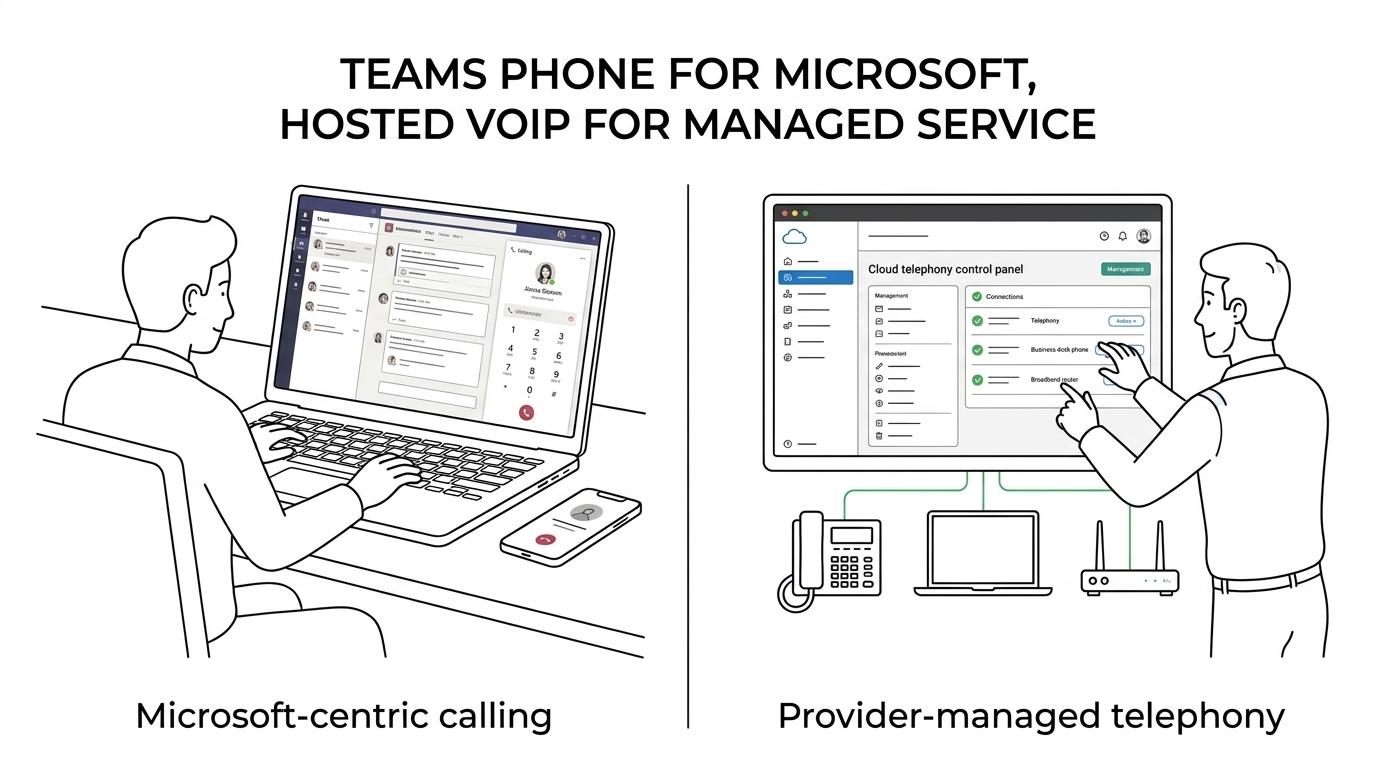
The trade-off is control versus convenience. Teams Phone can feel cleaner for Microsoft-first businesses. Hosted VoIP can feel cleaner for telephony-first businesses. A common mistake is assuming one is “modern” and the other is “old-school”. Both are cloud options. The real difference is operating model.
Teams Phone can look cheaper per user at first, but hosted VoIP can cost less to operate when it reduces admin, bundles support or avoids extra Microsoft voice components. Compare total monthly cost, call plans, devices, implementation work and support ownership.
With Teams Phone, costs may include the Teams Phone licence, a Calling Plan or operator service, devices, setup and ongoing admin. Microsoft says Teams Phone with Calling Plan includes a phone number and metered outbound calling minutes, and the domestic plan for the UK, US and Canada includes 3,000 outbound minutes. That can be attractive for predictable calling patterns.
Hosted VoIP pricing is often more inclusive, though structure varies by provider. The useful question is not “What is the cheapest licence?” It is “What will this cost to run for three years?” If hosted VoIP removes the need for separate telephony administration, faster fault resolution and extra supplier coordination, total cost can be lower even when the headline user price is similar.
Watch for hidden comparisons. If one quote includes porting, handsets, setup and support, while another shows licence cost only, the cheaper option may not stay cheaper for long.
Good cloud telephony design starts with call handling, not handsets. Map departments, opening hours, overflow rules and failover paths, then decide which numbers must port, which can retire and how calls route during broadband or power faults.
Begin with the caller journey. Who answers first? What happens at lunch, after hours or when the service desk is overloaded? Auto attendants, call queues and ring groups should match how the business actually operates, not how the old PBX happened to be configured.
Then handle numbering. Keep customer-facing published numbers unless there is a strong reason to change them. Porting usually preserves continuity, but timing matters. A common misconception is that number porting is an instant switch. It is a managed process with lead times, validation and risk checkpoints.
“Amazing Support says its hosted VoIP service can include voicemail-to-email, call queues, ring groups and call recording.”
Resilience needs equal attention. If internet access fails at one site, where do calls go? If office power drops, can calls reroute to mobiles or another location? If compliance requires call recording, set retention and access rules early. Recording is helpful, but it also creates governance obligations.
A smooth rollout is phased, tested and communicated early. Amazing Support is relevant here because managed providers can coordinate number porting, user setup and training alongside wider IT changes, which reduces the risk of voice cutovers happening in isolation.
Use Step 1: pilot first. Move a small user group with different profiles, including reception, management and remote staff. Test internal transfer, mobile app use, voicemail, queue performance and inbound presentation before the main migration date.
Then take Step 2: stage the cutover. Prepare handsets, user guides, emergency calling information and support cover in advance. If the business has multiple sites, move the simplest location first unless the head office has the strongest technical controls and user readiness.
Finish with Step 3: support adoption. Training matters because users need to know where blind transfer, attended transfer, voicemail settings and presence-based routing actually live. The phone system can be technically correct and still feel poor if the user experience is unfamiliar on day one.
“Amazing Support serves organisations across London, Hertfordshire and Manchester, with support for multi-site teams across the UK.”
The biggest mistakes are choosing on licence price alone, ignoring resilience, and assuming every hybrid user behaves the same. A hosted VoIP decision should reflect reception, mobile staff, compliance needs, and whether your team wants Microsoft-centric calling or provider-led telephony.
One common error is overvaluing handset continuity. Many businesses ask whether they can keep the same desk phones, when the more important question is whether the new call flow, app experience and failover design suit hybrid work. Hardware matters, but call handling matters more.
Another error is forgetting non-user endpoints. Door entry systems, lift lines, alarms and payment devices may still rely on legacy connectivity. If those are missed, the phone migration looks complete on paper while risk remains in the building.
The final trap is treating cloud telephony as a pure telecoms purchase. It now overlaps with identity, security, Wi-Fi, broadband, training and support processes. If your business wants one platform for meetings and calls, Teams Phone may be the logical fit. If you want telephony wrapped into a broader managed service with clearer supplier ownership, hosted VoIP is often the more practical answer.