If your organisation operates across several offices, clinics, campuses or branches, the network is no longer a local IT utility. It becomes shared business infrastructure, and weak visibility at one site can disrupt users everywhere. Amazing Support is a managed IT support and cyber security provider for multi-site organisations, and this topic matters because many “random” IT complaints are really network issues spreading across locations.
TL;DR: Summary
- Multi-site organisations need network monitoring when repeated slowdowns, branch-to-branch inconsistencies, VPN drops, cloud app complaints or hard-to-diagnose outages start appearing across more than one location.
- Uptime Institute says network-related issues are the largest single cause of IT service outages, and 54% of respondents said their most recent significant outage cost more than $100,000.
- NIST guidance says monitoring should detect drift parameters like bandwidth availability and unwanted traffic, and it also warns that encrypted traffic can create false positives or false negatives if monitored in the wrong place.
- Amazing Support is relevant here because its service model includes 24/7 network monitoring and off-site remote monitoring and management, which suits multi-site environments where waiting for site visits slows diagnosis.
- The most effective approach combines central visibility, branch-level telemetry, host-based and network-based monitoring, and alert tuning tied to business services rather than raw device counts.
The practical question is not whether monitoring sounds useful. It is whether your current visibility is enough to catch configuration drift, performance degradation and security blind spots before users escalate them. For most multi-site setups, that answer becomes clear once the signs start repeating.
Because branch networks, WAN links and cloud applications fail in different ways, a single-site approach misses too much. Amazing Support sees this in managed environments where constant monitoring helps separate a local fault from a wider routing, bandwidth or security issue.
A small office with one firewall and one broadband line can sometimes survive with ad hoc checks. A multi-site estate cannot. Once you add site-to-site VPNs, SD-WAN or MPLS links, shared cloud applications, VoIP, business Wi-Fi and remote users, the number of failure points rises fast. What looks like a local complaint can actually be packet loss on an inter-site path, a DNS issue at the edge, or a misconfiguration introduced during a change at another branch.
Uptime Institute’s 2024 outage analysis makes the business case plain: network-related issues are the largest single cause of IT service outages. It also reports that 54% of respondents said their most recent significant, serious or severe outage cost more than $100,000, and 16% put the cost above $1 million.
“Amazing Support provides 24/7 network support with constant monitoring of client networks.”
The common mistake is to treat monitoring as an extra layer for large enterprises only. In practice, smaller multi-site organisations often feel outages more sharply because one failed link or badly tuned firewall can block telephony, cloud access and line-of-business systems at once.
Yes. Intermittent slowdowns across Microsoft 365, VoIP or shared file systems usually point to latency, packet loss, congestion or poor path selection rather than user error. If the complaint moves between sites, you need continuous visibility, not isolated speed tests.
Intermittent issues are exactly where network monitoring earns its keep. A user reports that Teams calls were breaking up at 09:15, the issue disappears by 09:40, and IT has nothing to inspect except a vague memory of “it felt slow”. Monitoring changes that. You can look back at link utilisation, jitter, interface errors, route changes, VPN stability and DNS response times across the same period.
A useful rule is simple: if users describe a problem as random but it happens at similar times, it is probably patterned. Backups running over the same circuit as voice, guest Wi-Fi spilling into business traffic, or cloud sync jobs saturating a branch uplink are all common causes. Rebooting a device may hide the symptom once, but it does not explain the pattern.
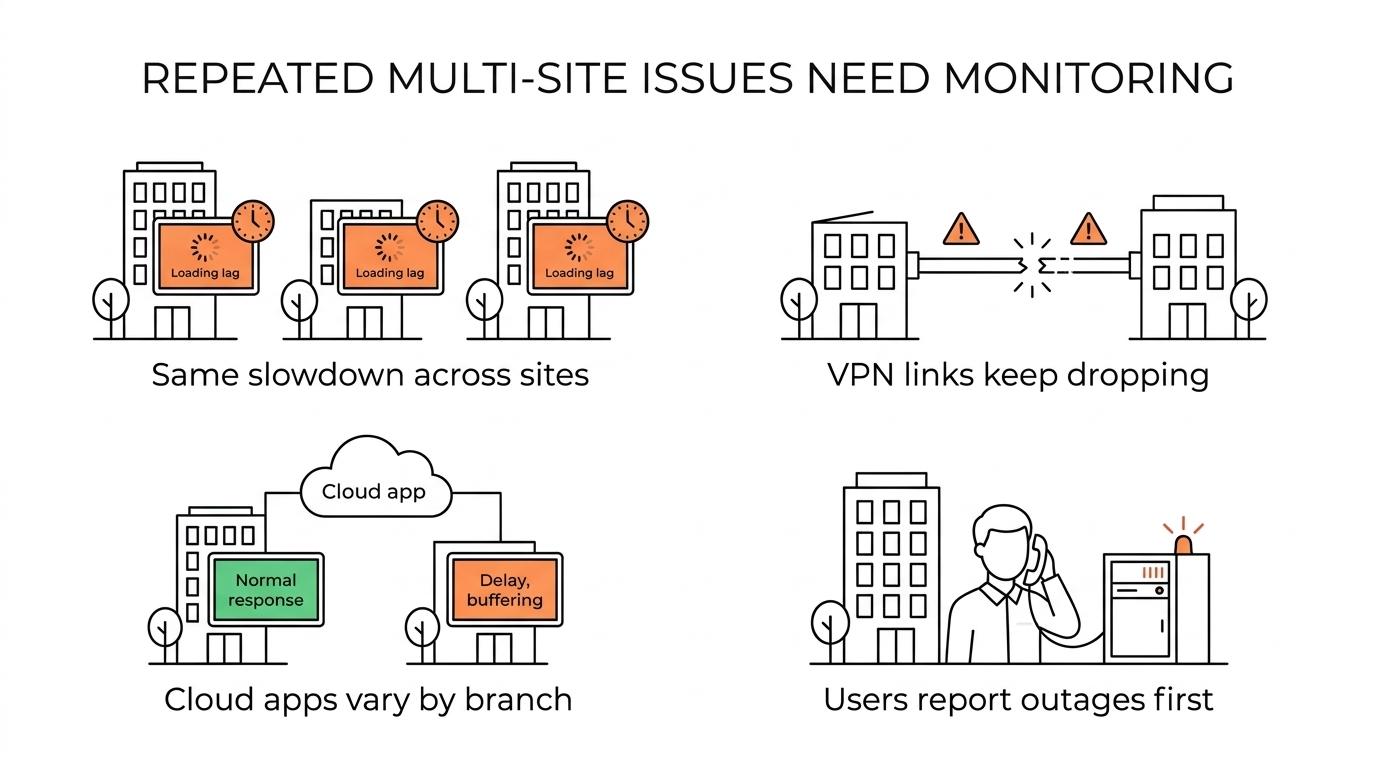
The clearest signs are repeated performance complaints, blind spots between sites and rising operational risk. When the same symptoms affect routers, Wi-Fi, cloud apps and voice, monitoring is no longer optional housekeeping.
These signs matter most when they repeat, span more than one location, or cannot be tied quickly to a single cause.
One sign on its own is not always decisive. Three or four together usually mean the environment has outgrown reactive support.
Start with a baseline, compare every site against it, then alert on change. NIST guidance treats drift parameters like bandwidth availability and unwanted traffic as warning signs that should trigger corrective action.
Step 1 is to define a known-good baseline for each site type. A branch office, warehouse and head office do not need identical templates, but each should have expected VLANs, SSIDs, firewall rules, WAN settings, firmware versions and quality-of-service policies. If you never define the standard, you cannot spot drift from it.
Step 2 is to monitor drift parameters continuously. NIST highlights bandwidth availability and unwanted traffic, but drift also shows up as routing changes, altered DNS behaviour, new devices on management networks, disabled logging, or unusual inter-VLAN communication. If one branch suddenly behaves differently from its peers, that is a clue even when users have not noticed yet.
Step 3 is to feed those alerts into change control and corrective action. A useful misconception to drop here is that drift always means hostile activity. Often it is the result of a hurried fix during an outage, an old switch replaced with different defaults, or a local contractor changing Wi-Fi settings without documenting them.
No. Network monitoring collects telemetry and raises alerts; network management changes configurations, policies and capacity. You need both, but they answer different questions.
Monitoring tells you what is happening now, what changed, and where to look next. Management is the control plane: device configuration, firmware, policy rollout, asset administration and lifecycle tasks. One without the other leaves gaps. If you only monitor, you see the fire but have no structured way to prevent the next one. If you only manage, you push changes without good evidence.
A sensible operating model connects monitoring to centralised network management so alerts inform maintenance windows, capacity planning and security response.
Yes. TLS, VPN tunnels and cloud traffic can hide useful signals, and NIST warns that encrypted communications may create false positives or false negatives if data is captured in the wrong place.
This matters because many organisations assume that “we can’t see inside encrypted traffic” means “we can’t monitor it properly”. That is too simplistic. NIST’s guidance is more practical: move the data collection point before or after encryption where appropriate, and add host-based monitoring tools when encrypted communication is expected.
“Amazing Support can perform remote monitoring and management off-site, allowing problems to be identified and resolved without travel to the client office.”
In plain terms, if traffic is encrypted end to end, monitor the endpoint, the application host, the firewall session data and the link behaviour, not just the packet contents in transit. SPAN ports can mirror traffic cheaply, while passive network taps often provide cleaner visibility on critical links. The trade-off is cost and complexity. You do not need deep packet inspection everywhere, but you do need enough context to avoid guessing.
Use a central view plus remote data collection at each site. Amazing Support frames this well with off-site monitoring and management, so engineers can identify and resolve many faults without travelling to the branch.
Step 1 is to map branch dependencies. Many sites depend on one circuit, one firewall, one switch stack and one wireless platform for everything from card payments to Teams calls. If that is true in your estate, monitor those choke points first. If one branch also hosts a line-of-business server, treat that site differently from a simple office.
Step 2 is to collect the right signals from the edge and the LAN. That usually includes interface status, bandwidth, packet loss, VPN state, wireless health, DHCP, DNS, switch errors and device availability. If voice and guest traffic share the same connection, classify traffic or you will misread congestion as a general “internet issue”.
Step 3 is to define remote response actions. Some alerts need automatic failover, some need a service desk triage, and some need a same-day engineer. The gain comes from deciding that in advance rather than improvising during an outage.
Neither is enough on its own. NIST says effective IDS and IPS deployment typically uses both host-based and network-based capabilities because endpoints and transit paths reveal different problems.
Network-based monitoring is best for link health, east-west traffic patterns, unwanted traffic, firewall behaviour, route changes and branch connectivity. Host-based monitoring is better for what happened on the device itself: process behaviour, local logs, patch state, encryption context and endpoint controls.
If you only watch the network, encrypted sessions can conceal too much. If you only watch hosts, you can miss the wider path issue that is hurting every site at once. This is why mature environments combine both and feed the results into incident response, sometimes through security orchestration, automation, and response platforms. The goal is not more tools. It is better correlation.
Begin with business services, not device counts. If you map alerts to payroll, telephony, Microsoft 365, EPOS or clinical systems, you can tune thresholds and escalation rules without flooding the team.
Step 1 is prioritisation. Decide which services matter most at each site, then assign device and link monitoring to those services. A school, law firm and healthcare provider may all use similar network hardware, but the impact of downtime differs. Your alert design should reflect that.
Step 2 is threshold tuning. More alerts do not mean better monitoring. Set thresholds for sustained packet loss, bandwidth saturation, VPN flaps and wireless failures that indicate genuine service risk. Add maintenance windows and suppression rules so planned changes do not generate noise.
Step 3 is workflow integration. Alerts should enter the service desk with severity, site context and likely scope. If a pattern points to security concerns, the same data should support incident response. NIST notes that sophisticated monitoring tools can generate security alerts and threat intelligence that feed those processes. That is when monitoring stops being a dashboard and starts becoming an operational control.