Endpoint security is often framed as a technical subject. People talk about antivirus, endpoint detection and response, encryption, patching, mobile device management and zero trust policies. All of that matters. Yet the real test happens when a person unlocks a laptop, approves a sign-in prompt, taps a link on a phone, or decides whether to report a suspicious message.
That is why staff buy-in is not a nice extra. It is part of whether endpoint security works at all. The National Cyber Security Centre is clear that awareness and training on their own are unlikely to improve compliance unless they reflect how people actually work. Verizon’s 2026 breach findings tell a similar story from another angle: software vulnerabilities are now the top initial access path, yet the human element, including phishing, social engineering and stolen credentials, still features heavily in successful breaches.
Every endpoint is a doorway into business systems. Laptops, desktops, tablets, mobiles, thin clients and even home devices used for work can all become entry points. Security tools can watch those devices, block threats and report risk. They cannot make every decision for the user holding the device.
In practice, endpoint security rests on small actions repeated every day. A missed update, a reused password, an unreported lost phone, or a hurried tap on a fake text message can weaken even a well-funded security stack. When staff accept the controls around them, those moments become safer. When they resist them, the controls are often bypassed in quiet ways that never appear in a policy document.
A few everyday behaviours have a direct effect on endpoint security:
The mobile point deserves real attention. Verizon reports that click rates are markedly higher on mobile devices, and that fake texts and scam calls can be more persuasive than classic email phishing. That matters because many staff switch between laptop and phone all day, often when they are distracted, travelling, or working outside the office. An endpoint strategy that ignores those habits leaves a gap attackers are happy to use.
People rarely bypass controls because they want weaker security. They do it because the control feels confusing, slow, or out of step with the job they need to do. If a patching schedule interrupts client meetings, updates get delayed. If multi-factor authentication prompts arrive with no context, users approve them out of habit. If file-sharing rules are awkward, staff may move data into personal tools.
This is exactly where buy-in changes the outcome. When people know why a control exists, when the control fits the working day, and when help is easy to reach, compliance rises. NCSC guidance points to role-based awareness and training, backed by communication methods that match the audience. That means senior leaders, front-line staff and technical teams should not all receive the same message in the same format.
Buy-in usually improves when a security programme gets four basics right:
There is also a trust issue. Staff can spot the difference between a policy imposed on them and a policy built with their day-to-day work in mind. If the security team or IT partner listens, adjusts where sensible, and explains trade-offs plainly, staff are more likely to treat endpoint controls as part of good work rather than as an obstacle.
A positive cyber security culture does not mean staff become security specialists. It means they see security as part of professional practice, and they feel comfortable doing the right thing. That can be as simple as asking before installing software, questioning an odd login request, or reporting a mistake quickly instead of hiding it.
This matters because speed often decides whether an incident becomes a crisis. If someone clicks a malicious link and reports it at once, the device can be isolated, credentials reset and the wider estate checked before serious damage spreads. If that same person stays silent out of fear or embarrassment, the attacker gains time.
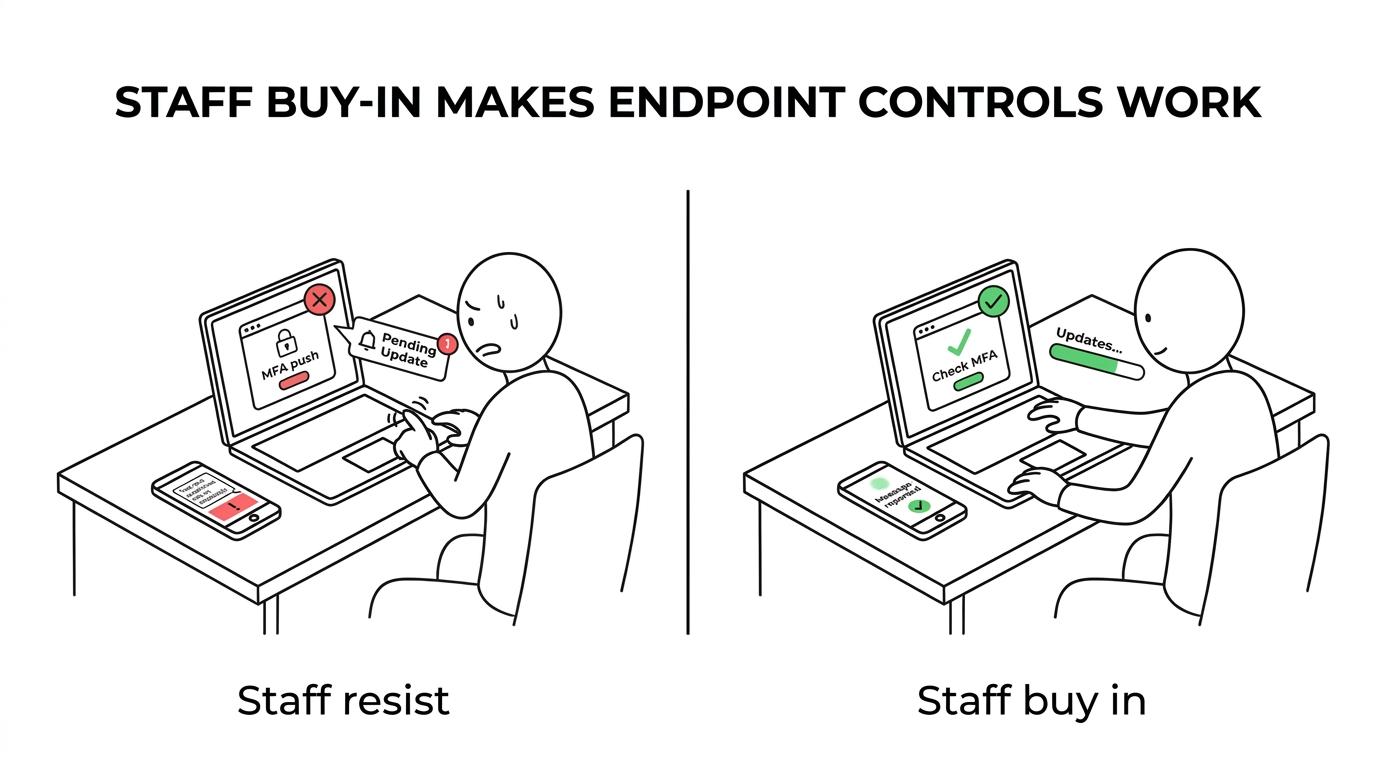
For many organisations, the shift begins when staff are treated as the first line of defence rather than as the weakest link. That language changes behaviour. It gives people ownership and makes training feel relevant rather than punitive.
| Endpoint security area | When staff resist | When staff buy in |
|---|---|---|
| Patching and updates | Reboots delayed, known flaws stay open | Updates happen within agreed windows |
| Multi-factor authentication | Prompts approved without checking | Unexpected prompts are questioned and reported |
| Device loss procedures | Delayed reporting increases exposure | Lost devices are reported quickly for remote action |
| Phishing and smishing | Suspicious messages are ignored or clicked | Staff report messages early and warn colleagues |
Training works best when it connects directly to the job in front of the learner. NCSC guidance supports this view, stating that organisations should define cyber security training and awareness for all roles, from executives to junior staff, and use a range of teaching and communication techniques. A finance team handling payment requests does not face the same endpoint risks as a field worker relying on a mobile phone, or a practice manager who shares files with external partners.
Role-based training also helps staff see what good behaviour looks like on their own devices. A short module on spotting a fake Microsoft 365 login page may help office teams. That risk is not only about awareness, either, as SRS Networks notes in its review of signs that Microsoft 365 needs expert management, where weak configuration and inconsistent oversight can leave common login workflows easier to abuse. A session on physical device security, screen privacy and public Wi-Fi may matter more for travelling staff. Leaders may need sharper guidance on approval fraud, account takeover and the extra risk that comes with privileged access.
A useful training plan tends to include a few clear features:
Training on its own is still not enough. If staff are told never to install unapproved software but have no quick route to request a tool they need, shadow IT will grow. If people are taught to report suspicious prompts but the reporting route is hard to find, good intentions fade. The message and the operating model need to support each other.
That is where managed support can make a real difference. A provider that combines endpoint management with staff training, monitoring and clear ownership creates stronger habits over time. Amazing Support takes that approach by pairing cyber security work with staff training and ongoing support, with the aim of helping people protect data rather than simply placing rules in front of them.
The strongest security programmes usually start with clarity. Staff should know what is changing, why it is changing, and what is expected from them. A rushed rollout invites confusion. A well-planned rollout gives people time to prepare and ask useful questions.
Leadership behaviour matters too. If senior people insist on exceptions, delay their own updates, or ignore mobile security rules, the rest of the organisation notices. If leaders follow the same controls as everyone else, the message is stronger and far more credible.
Usability should be treated as part of security, not as a separate concern. Single sign-on, sensible device policies, prompt helpdesk support, and realistic patch windows all make secure behaviour easier. This is not about making every control invisible. It is about removing unnecessary friction so staff do not feel pushed towards risky shortcuts.
Communication style also shapes buy-in. Short, plain guidance often works better than long policy documents. A brief note before a patch cycle, a clear explanation of a new mobile policy, or a fast response to questions can prevent frustration from hardening into resistance.
When organisations review their current approach, a few questions are especially helpful:
The last point is often underrated. People are far more likely to back endpoint controls when support is responsive and ownership is clear. A dedicated contact, regular check-ins and practical advice can turn security from a source of friction into a stable part of daily operations.
Buy-in is visible. You can see it in the pace of patching, in how quickly lost devices are reported, and in the number of suspicious messages submitted by staff before an incident spreads. You can hear it in the language people use, too. Teams stop asking how to avoid a control and start asking how to work safely within it.
There are usually some early markers:
Strong endpoint security is never just a product purchase. It is a working relationship between tools, processes and people. When staff accept their part in that system, controls become more effective, reporting gets faster, and attacks find fewer easy openings. That is when endpoint security moves from being an IT task to being part of how the organisation works each day.